


Send an eSIM to any employee by email. They scan the QR code and they're online, with nothing to post or collect.
Bring every office, team and cost centre into one company account, each with its own users and budget.
Live usage and cost for every line, so finance knows the number before the invoice arrives.
Google Workspace SSO, MDM provisioning and an API that fits your existing IT setup.
No setup fee and no minimum. Pay only for the plans your people use, with custom pricing for larger teams.
Say goodbye to expensive roaming fees. Our flexible B2B eSIM plans adapt to your business usage.
The same dashboard runs a small team or a global workforce across 200+ destinations.
Enterprise-grade security with SSO, MFA and access controls.
Set Up Your Company
Account Today
Open an account, invite your team and give out your first eSIMs without waiting on a sales call. There's no contract and no minimum volume, and most companies are up and running the same day. Need custom pricing, SSO or API provisioning? Our team will set it up with you.
Take a Tour of the Dashboard
The ZIM dashboard gives admins, finance and team leads one login to run every employee eSIM. Order plans for 200+ destinations, track usage and spend live, approve requests and manage billing, teams and users in one place. Use the arrows to explore each area.

1.
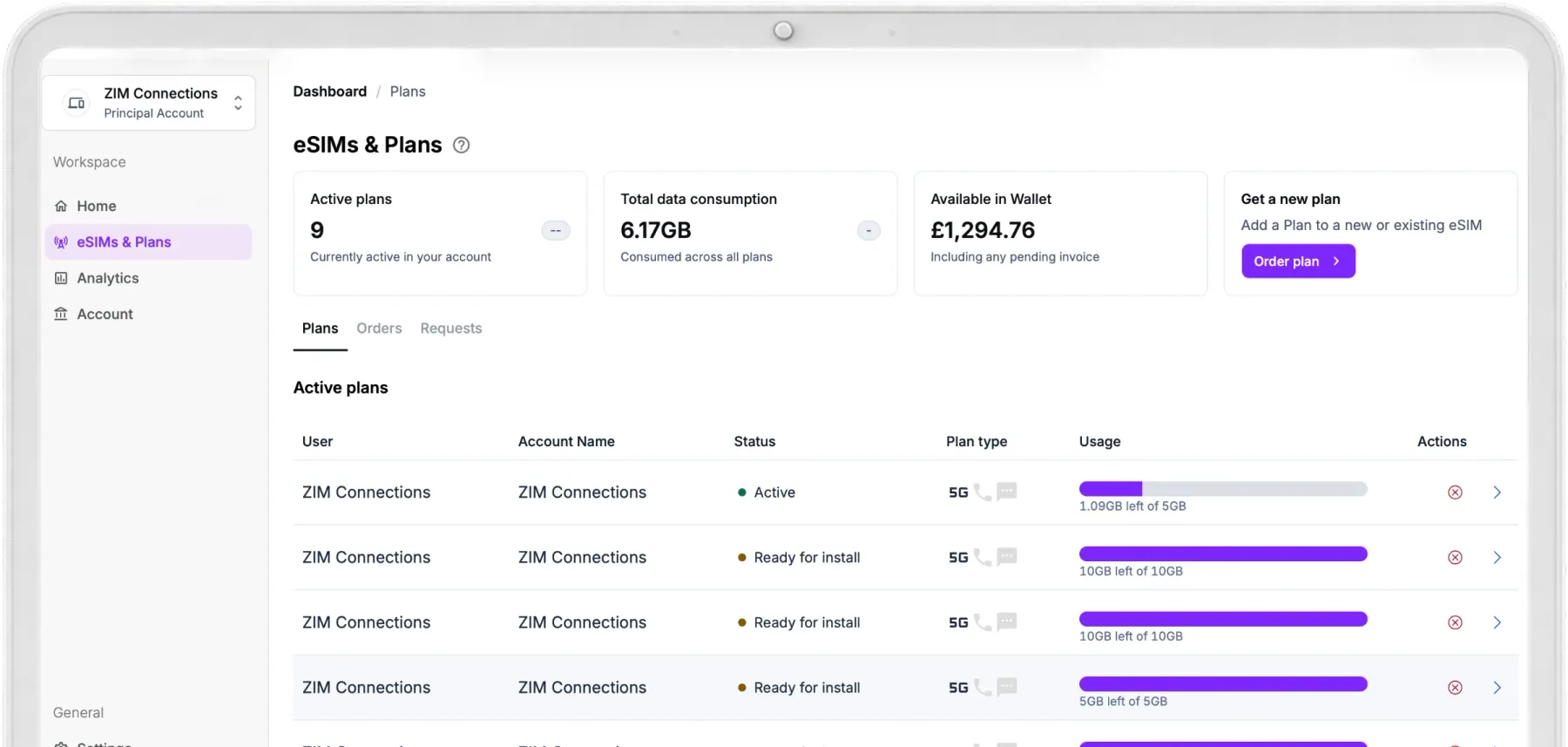
Every Plan, Order and Request in One Place
See every employee's plan, its install status and how much data is left. Plans, Orders and Requests each have their own tab, so nothing gets lost.
2.
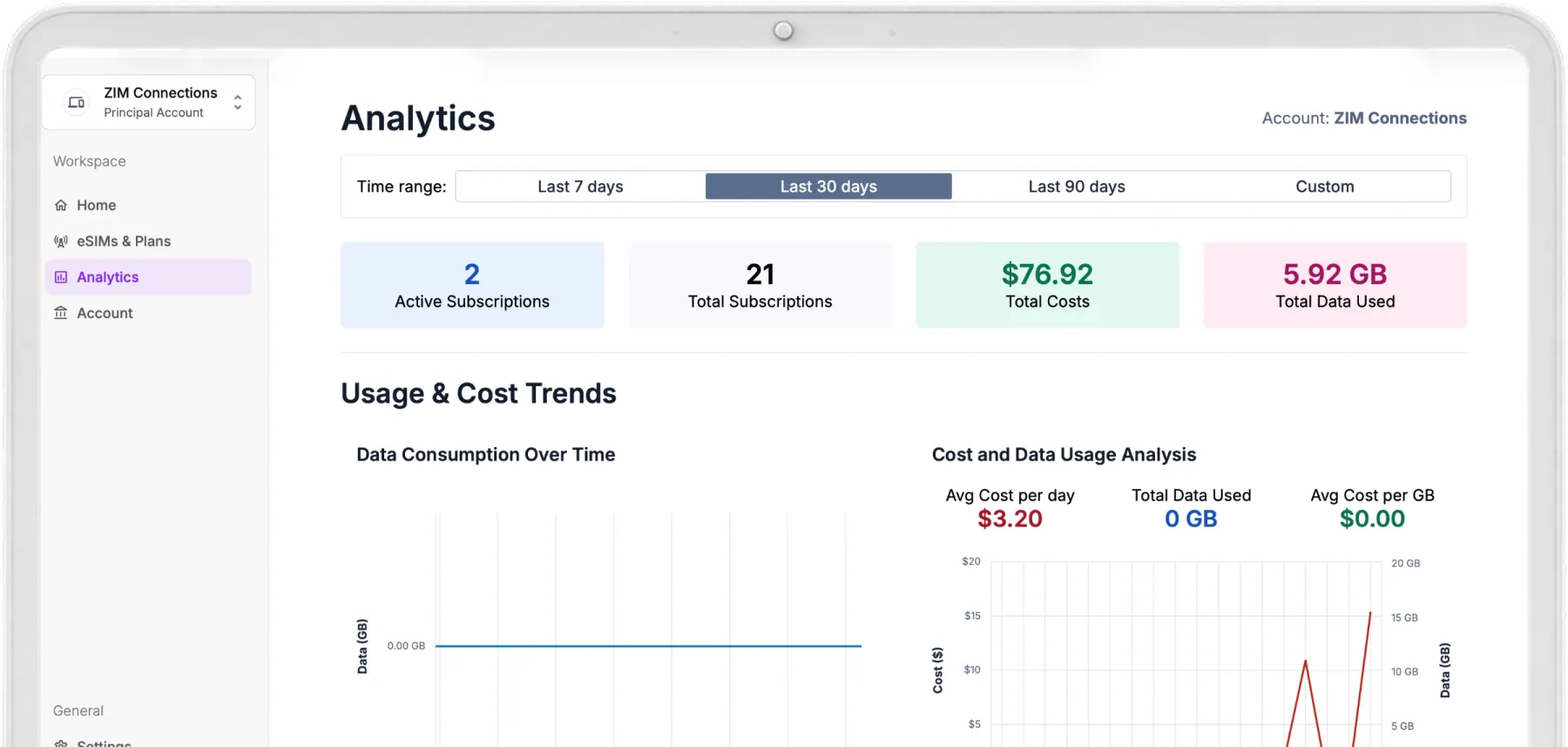
Usage and Spend Over Time
See how your company uses data and what it costs, so you can control spend and spot trends early.
3.
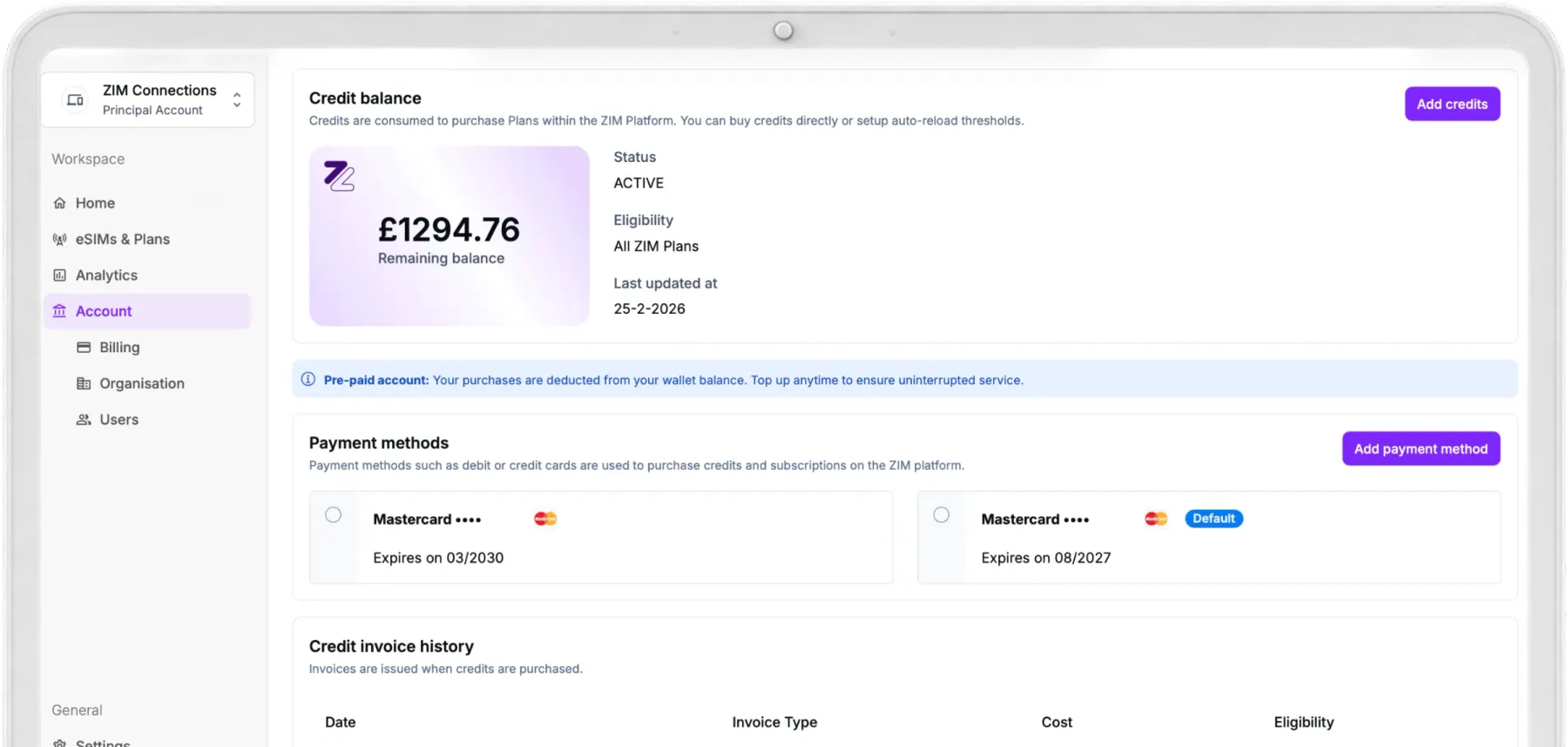
A Wallet That Keeps You Connected
Top up a shared balance, manage payment methods and download invoices, all from Account → Billing.
4.
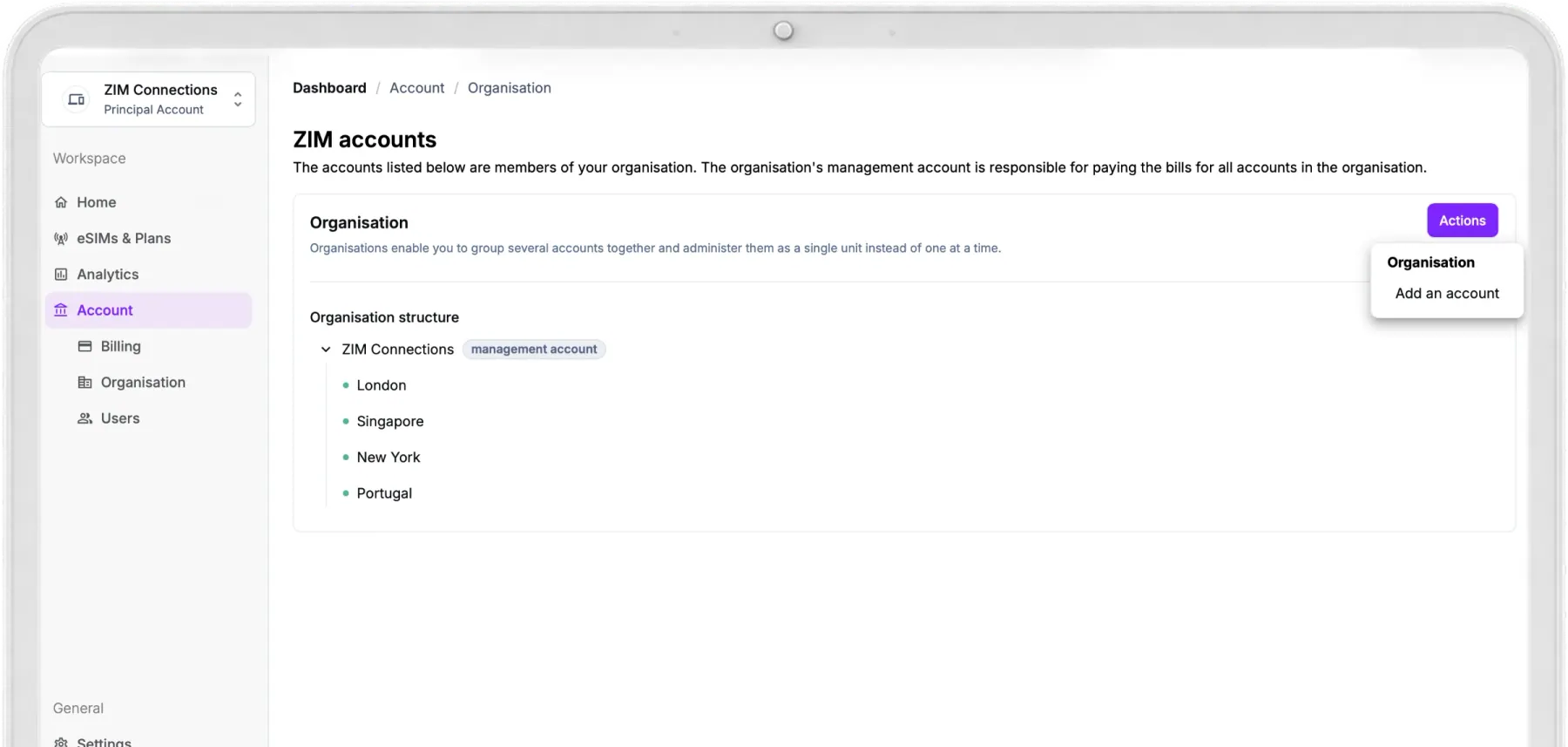
Your Company Structure, Mirrored
Set up accounts for each office, country or department, and keep central control from one management account.
Deploy Employee eSIMs in Minutes, Not Weeks
No physical cards to post and no carrier forms to fill in. Admins assign plans in a few clicks, and employees can request what they need.
How to Give an Employee
an eSIM in Five Steps
Most admins assign their first eSIM in under a minute.
- Pick a destination
- Any of 200+ destinations.
- Set travel dates
- When your employee needs to be connected.
- Choose a plan
- Compare data plans for that trip.
- Select a user
- Anyone in your organisation.
- Confirm purchase
- The eSIM QR code arrives by email.
Built for
Your Travellers Too
Users ask for connectivity when they need it. Admins stay in control of every request.
- Self-serve usage
- Travellers see data used, data left and plan validity.
- Request a plan or top up
- From the dashboard or their confirmation email.
- One-click approval
- Approved data lands on the same eSIM, with no new QR.
Manage Every Plan,
and Every Expenditure
-


-

-


-


-



Control at Every Level of Your Company
Most business telecoms solutions need IT to set up access. Here you decide who can buy, who sees the numbers and how each team pays, all from one management account.
The Right Access
for Every Role
Invite people by email, choose their account and set exactly what they can do.
- User
- Uses their assigned eSIM, checks usage and asks for more data.
- Purchaser
- Buys plans and assigns them to users.
- Analyst
- Views usage and cost reports, with no buying rights.
- Administrator
- Manages users, plans, analytics, billing and settings.
One Company,
Many Teams
Set up an account for every office, country or department, each with its own users, plans and budget.
- Budgeted
- Spends from the company wallet, within the budget you set.
- Independent
- Adds its own card and pays for its own plans.
Analytics That
Finance Will Love
See how your company uses mobile data and what it costs, then act before the invoice arrives.
- Pick your time range
- The last 7, 30 or 90 days, or any custom period.
- Usage and cost trends
- Data use over time, plus cost per day and per GB.
- Read only for analysts
- Share reports with finance without giving them buying rights.
SLAs, Security and Compliance, Built In
Your company's eSIMs run on the same platform our telco and enterprise partners rely on, with clear service levels and the standards you'd expect from a UK business telecoms provider.
Service Levels You Can Count On
Agreed SLAs, backed by Level 2 technical support from a team that knows your account.


Enterprise Sign In
Single sign on, multi factor authentication and access by role, so only the right people see the right data.


Full Audit Trail
Every order, approval and change is logged, so finance and IT always know who did what and when.
Certified Provisioning
eSIM provisioning is GSMA RSP certified for security and works across devices worldwide.
Privacy by Design
Built to comply with GDPR and CCPA and aligned with ISO 27001, with data protection at every step.
Secure Payments
Card payments and wallet top ups are handled to PCI standards, with an invoice for every transaction.


Help When You Need It
Step by step guides for every feature are in the Help Centre. For anything else, email [email protected].
How SoftBank Launched eSIM Roaming
Across 200+ Destinations
Case Study

Don't Just Take Our Word for It
Ask ChatGPT, Claude or Perplexity how the ZIM Business Suite can help your business, from travelling teams to UK numbers and branded eSIM sales.

FAQ
Frequently Asked Questions
Everything you need to know about the ZIM Business Suite dashboard.
How do I assign a data plan to an eSIM, and where do I find the QR code?
On the Home screen, select the destination and travel dates, choose the eSIM plan, select a user and confirm the purchase. Go to eSIMs & Plans, select the eSIM, click the arrow on the right and open See details. You can also download or resend it from there.
Can I install the same eSIM on multiple devices?
No. Each eSIM installs on one device only, so assign a separate eSIM for every phone or tablet.
What happens when data runs out, and can admins top up?
Connectivity stops. You can add a new plan at any time, or the user can request a top up that is added to the same eSIM once an admin approves it. Yes. Admins can top up any employee eSIM from the dashboard at any time.
Can I get a refund for an eSIM, and does account credit expire?
Yes, if the eSIM has not been installed and no data has been used. The amount returns to your account balance, or is removed from your monthly invoice on postpaid billing. No. Account credit stays on your business account until you use it.
Can I use the dashboard on a postpaid model?
Yes. Postpaid billing is available for enterprise customers with a deposit. Contact [email protected] to activate it.
What are the different user roles?
User, Purchaser, Analyst and Administrator. Users manage their own eSIMs, Purchasers buy and assign plans, Analysts view usage, and Administrators manage everything except ownership transfer.
The eSIM is installed but there is no internet. What should I check?
Make sure mobile data is on, the ZIM eSIM is the default for mobile data and data roaming is on. Then switch airplane mode on and off. If it continues, email [email protected].
See the Dashboard in Action
Tell us what you want to manage and we'll walk you through the ZIM Business Suite.
- A 30-minute call to scope the right model for your roadmap
- A tailored pricing and margin breakdown for your markets
- A clear launch timeline, from one day to a few weeks